Your setup, your codes, one link
Build My Rig is the sim racing price comparison I built. Your page on it shows your setup, today's price of every part and your codes, in one link for your bio: it answers "what's your setup?" and "how much does it cost?" once and for all.
In short
- What it is: a Build My Rig page with your setup part by part, the price of every part across the shops, your photos and your channels.
- What you get: your affiliate links and promo codes are the ones on this page, and the commissions stay yours.
- How long: about 15 minutes for a setup of 6 to 10 parts, plus 2 minutes per shop you have a code for. It's free.
What you get
On your page, and on the product sheets opened from it, your links are the ones used in every shop you have a code for. The commissions go to you, through your own affiliate programme, and you see your clicks per shop in "Your stats", on your profile.
The trade-off, honestly: the shop put forward is always the cheapest one that delivers to your visitor. If it's a shop you have no code for, it comes first, with my link. But wherever you have a code, in each product's list of offers as at the top, your link is the one used. That is what keeps your page honest, so useful to your audience.
One example: a creator who put their page in their Instagram bio gets about 180 visitors a month.
What I get out of it
I'm Gaëtan, from the Gaga Racing channel, and Build My Rig is my project. My own links are used only in the shops where you have no code, and some of your visitors come back to the site later. To be transparent: I make next to nothing from it, I'm not even breaking even. The site exists because I needed it to showcase the community's setups.
My guarantee: in a shop where you have a code, the link is built with your own id, never with mine. I never replace your codes with mine.
What I see: your codes and your clicks are stored in the site's database, which I can read as its administrator. No page shows them to anyone but you, and I give them to no one. Your stats are numbers only: no name, no address of your visitors.
What the site stores is detailed in the privacy policy.
The 4 steps
Create your account
Where to go: On the sign-in page, pick "Continue with Google", or "No account? Create one" to sign up with an email.
Result: You're signed in. Your display name, which you pick on your profile, gives your page its address: buildmyrig.gg/u/your-name.
Good to know: You set your display name in "My setup", "Profile" tab, "Basic information" section, "Display name" field. Pick it before you share: if you change it, your profile's old address stops working (your builds' addresses follow and redirect).
Create my accountBuild your setup and publish it
Where to go: In the menu, "Builder". Fill in the "Base", "Wheels", "Pedals", "Chassis", "Display" and "Accessories" sections, then click "Publish my build".
Result: Your setup is on your profile, with today's price of every part and the cheapest shop that delivers to your visitor.
Good to know: A VR headset and screens go in "Display", the seat and the monitor stand in "Chassis". "Your PC" is optional and not counted in the total. A product missing from the catalogue can be added by hand with "or enter it manually", in the product search. Publish before the next step: your codes apply to your builds' links.
Open the builder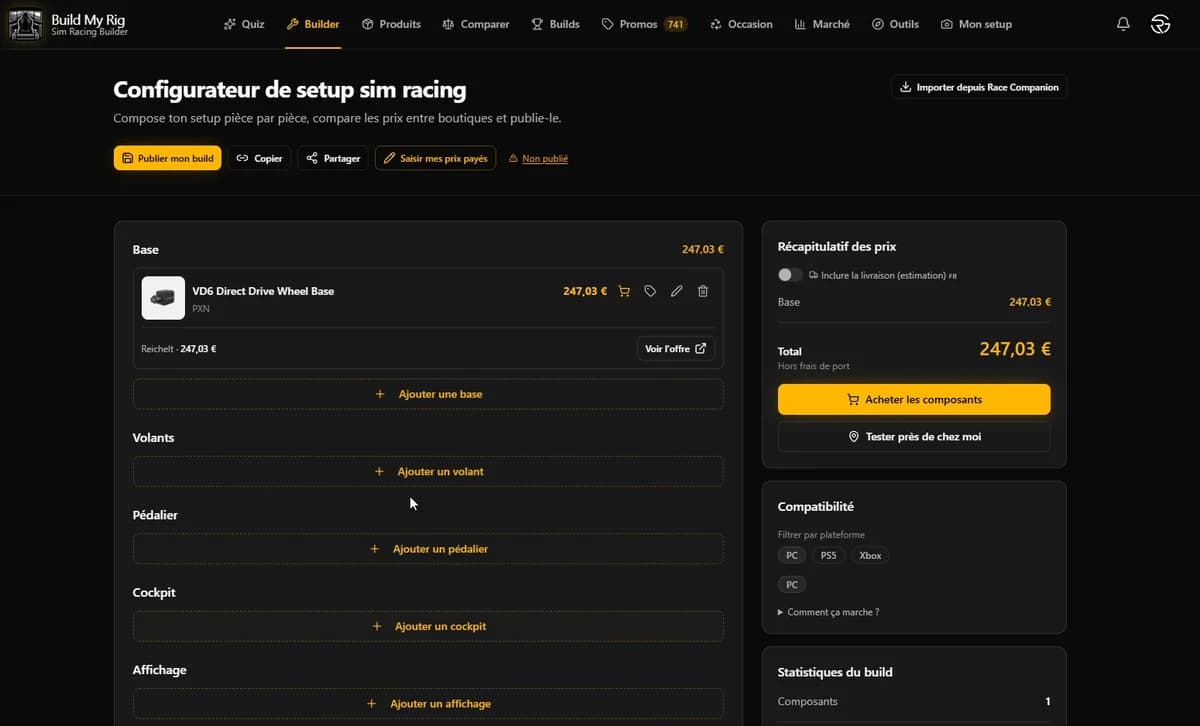
The builder: every part with its best price, and "Publish my build" at the top left. Add your channel, then your codes
Where to go: In the menu, "My setup", "Profile" tab. Each section opens with a click on its title. Then, in this order:
"My channels"
Paste your YouTube, Twitch, TikTok or Instagram channel. That is what makes the section for your codes show up right below.
"My affiliate links and promo codes"
Click "Add a shop" and pick the shop. Paste your affiliate id: the part of your affiliate link that identifies you (in simufy.com/?ref=yourname, it's "yourname"). You can also paste your whole link, the site reads the id from it; for Fanatec and Logitech, paste your full tracking link. The field shows an example for each shop. Add your promo code if you have one: it shows on your profile.
"Test the link", then "Save my codes"
"Test the link" shows you the link of one of the shop's products with your id, so you can check it lands in the right place. It doesn't ask the shop anything: it can't tell whether your affiliate account is active. Finish with "Save my codes".
Result: The links to those shops, on your builds, carry your codes. With at least one code and a YouTube, Twitch, TikTok or Instagram channel, you get the Creator badge on your profile and builds (X and a website don't count).
Open my profile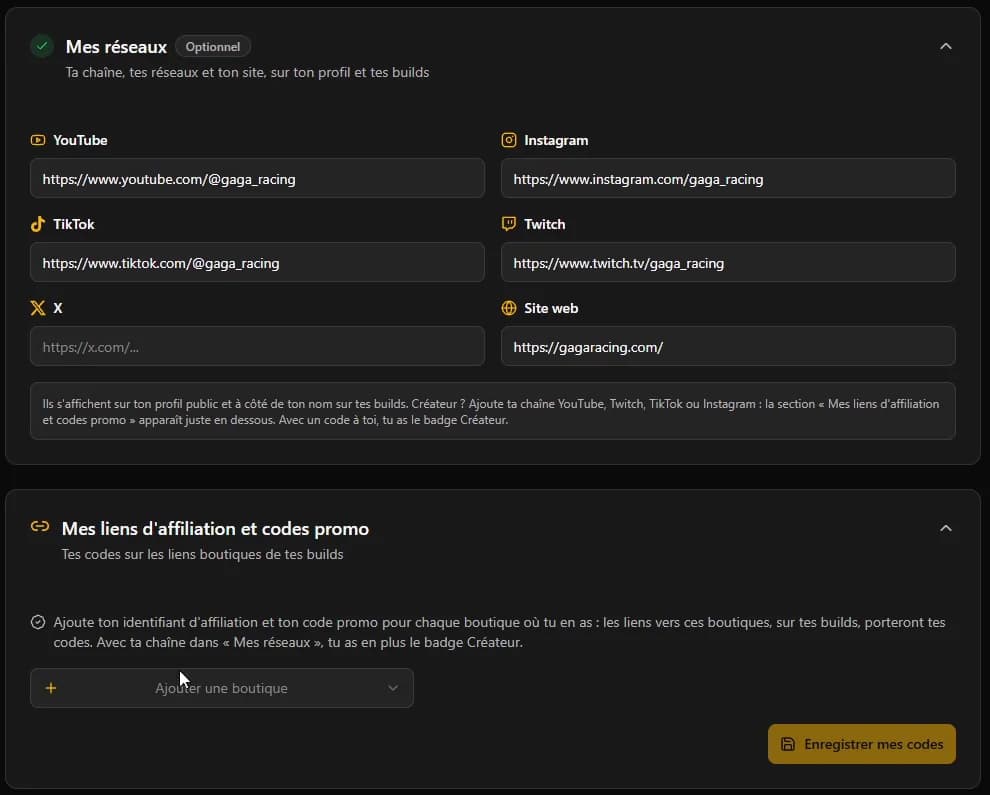
"My channels", then "My affiliate links and promo codes": "Add a shop", and "Save my codes" at the bottom. Share your page
Where to go: Once your codes are saved, the "My affiliate links and promo codes" section gives you two addresses to copy: "Your main build" and "Your profile".
Result: Your audience sees your setup and its prices without an account, and every click to a shop you have a code for leaves with your code.
Good to know: Share "Your main build" first: it answers "what's your setup?" right away, with the prices, and its address keeps working if you change your name. "Your profile" also shows your promo codes and all your builds. Put them in your Instagram or TikTok bio, your YouTube descriptions or your Linktree. On Twitch, add a command to your chat bot (for instance !setup) that replies with the link.
See my setup as an example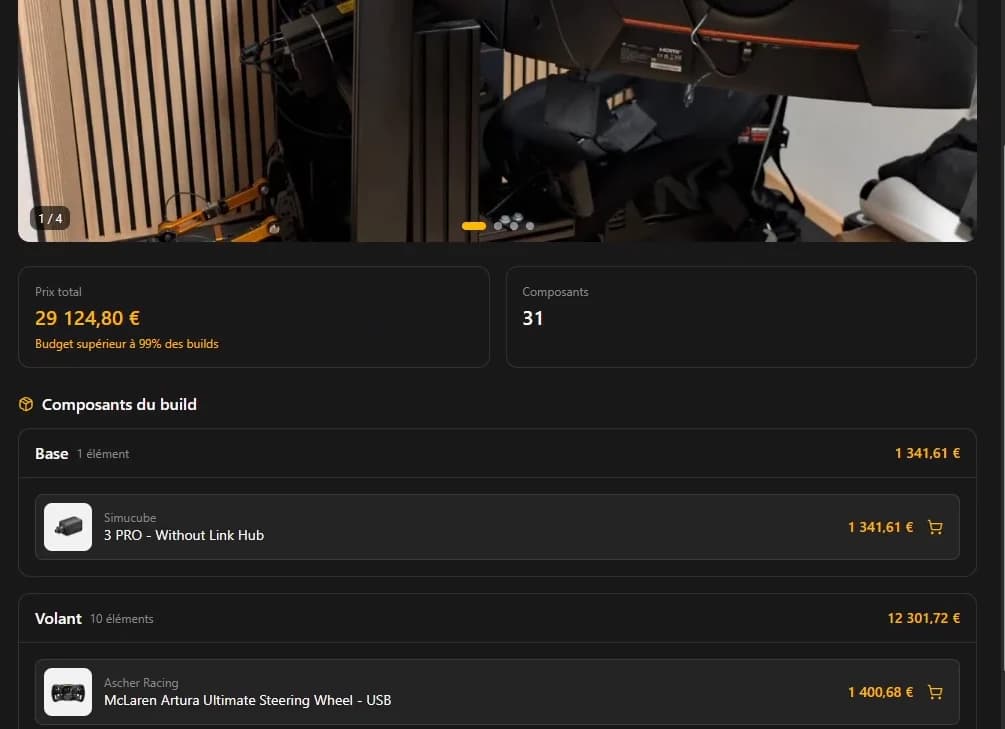
My setup as an example: the photo, the total price, then every part with its price. Yours can be 3 parts.
The shops and brands your codes work with
These are the 35 shops of the "Add a shop" menu:
- Apex300
- Asetek SimSports
- BavarianSimTec
- Fanatec
- FastPrint3D
- German SimRacing
- LDLC
- Logitech
- Materiel.net
- MOZA
- Pimax
- RaceAnywhere
- RSEAT
- Sensit
- Sim-Lab
- Simagic
- SIMGASM
- SimHub.pro
- Simline
- SimMotion
- SimRacerZone
- SimRaceWebshop
- Simruito
- Simsonn
- Simube
- Simufy
- Simultimate
- Simwear
- SimX Pro
- SRP
- Stealth Gamer
- TFS
- Thrustmaster
- Trak Racer
- VRS
Several brands' official shops are among them (Asetek SimSports, Fanatec, Logitech, MOZA, Pimax, Simagic, Thrustmaster): a code given by one of these brands, Pimax for instance, works on its official shop.
Yours isn't there? Write to me at contact@buildmyrig.gg with the shop and your code: if its affiliate programme can be linked to the site, I add it by hand, and it shows in "Other codes, added by Build My Rig" on your profile.
Your questions
What is Build My Rig?
The sim racing price comparison I built: 78 shops tracked every day, and a builder to put a setup together part by part. I first made it to showcase the community's setups without filling everything in by hand.
One link for my whole setup?
Yes. Your page shows every part of your setup, today's price and the cheapest shop that delivers to your visitor, with your photos and your channels. Put that link in your bio, and you never have to answer "how much does it cost?" again.
How is it different from a Linktree?
A Linktree lists links. Your Build My Rig page shows your setup itself: every part, today's price across the shops, and your codes. The two go well together: put your page in your Linktree.
What does my audience see on my page?
Your setup part by part, with today's price and the cheapest shop that delivers to them, your photos, your channels and, on your profile, your promo codes. No ads: there are none on any Build My Rig page.
Does it already work for others?
Yes: a creator who put their page in their Instagram bio gets about 180 visitors a month. It's still recent, and I'd rather give you this real figure than a promise.
How long does it take?
About 15 minutes for a setup of 6 to 10 parts, plus 2 minutes per shop you have a code for. Photos on top, if you add some.
Does it cost anything?
No, it's free: no subscription, and nothing is taken from your commissions.
Do you fill in my page?
No, you do: you build your setup and paste your codes. That way your page says exactly what you own.
Do I keep my current partner codes and links?
Yes. You paste your own ids into "My affiliate links and promo codes": they are the ones used on your page, and the commissions go to your account with the shop or the brand, as they do today. Build My Rig takes nothing on those sales.
Do my links really go to me?
Yes. On a click, the visitor goes through a Build My Rig redirect, which counts the click for your stats, then lands on the shop with your id in the address. To see it yourself, "Test the link" shows you a product's link with your id: open it.
Which shops take my codes?
The 35 of the "Add a shop" menu: Apex300, Asetek SimSports, BavarianSimTec, Fanatec, FastPrint3D, German SimRacing, LDLC, Logitech, Materiel.net, MOZA, Pimax, RaceAnywhere, RSEAT, Sensit, Sim-Lab, Simagic, SIMGASM, SimHub.pro, Simline, SimMotion, SimRacerZone, SimRaceWebshop, Simruito, Simsonn, Simube, Simufy, Simultimate, Simwear, SimX Pro, SRP, Stealth Gamer, TFS, Thrustmaster, Trak Racer, VRS.
My shop isn't in the list?
Write to me at contact@buildmyrig.gg with the shop and your code. If its affiliate programme can be linked to the site, I add it by hand, and it shows in "Other codes, added by Build My Rig" on your profile.
What about the shops where I have no link?
Their links stay Build My Rig's. The shop put forward doesn't change for it: it is always the cheapest one that delivers to your visitor.
I have no affiliate code, what's in it for me?
A showcase: your full setup, your photos and your channels on one page to share, which answers "what's your setup?" and "how much does it cost?". The Creator badge needs your channel in "My channels" and at least one code, but your page works without.
How do you make money?
With my own links, only in the shops where you have none, and with the visitors who come back to the site. Honestly, I make next to nothing: I'm not even breaking even.
Will the site last?
I can't promise it. I've been building it for more than a year, I use it for my channel, and I have no plan to stop. And whatever happens, your channels and your codes stay yours: your page only shows them.
Can I see my clicks?
Yes, in "Your stats", on your profile, once your codes are saved: your clicks to the shops over the last 30 days, shop by shop, and the views of your builds. Only you can see them. Clicks are counted since 27 October 2026.
Can I change my setup or my codes later?
Yes, whenever you want: your setup in the builder or on your profile, your codes in "My affiliate links and promo codes", then "Save my codes". Your page follows.
I have several setups, or I change gear often?
You can have several builds on your profile ("New build") and mark one with "Set as primary": that is the one the "Your main build" address shows. When you change gear, update your build. Your codes apply to all your builds.
My audience is abroad?
No problem. The site takes each visitor's country, which they can change: they see the shops that deliver to them, with their prices and their currency, and the shop put forward is the cheapest one that delivers to them. Your codes are used in every shop you have one for.
Do people need an account to see my page?
No: your profile and your builds open without an account, on a computer as on a phone.
Where do I put the link?
Wherever people ask for your setup: your Instagram or TikTok bio, your YouTube descriptions, your Linktree, a command of your Twitch chat bot (for instance !setup) or a pinned message on your Discord.
Does it work on a phone?
Yes, your page and the builder alike. To build your setup the first time, a computer is more comfortable.
Do you contact my audience or sell data?
No. Your visitors see your page without an account, I don't contact them, and no data is sold or used for targeted advertising: it's in the privacy policy.
Can I delete my account?
Yes: "My setup", "Settings" tab, then "Delete my account". Your account, your builds, your profile data and your photos are deleted for good.
A question that isn't here? Write to me at contact@buildmyrig.gg or on the Discord.